The California Crafters Club of Etsy (CCCOE) is a group of independent artists, crafters, & artisans from California who sell their wares on Etsy.com.

Tuesday, February 26, 2008

CCCOE UPDATE .....

CCCOE says: CA rocks (and it's not just earthquakes!). We are moving and shaking this week with: 1. February Design Challenge is on! Any California shop owner can enter a piece under the topic of "Lucky Charms". Tag it with 'cccoe' and 'februarychallenge', then copy and paste it into the list at the end of this thread http://www.etsy.com/forums_thread.php?thread_id=5454409 Challenge runs through midnight PST February 29. We will announce in this thread how we will handle voting on the challenge. 2. Head's up that our team site is going to have some maintenance! No big restructure, just a simple close and re-open. Why? Our team 'buyer' was upgraded in anticipation of becoming a team shop using one of our members credit card and personal bank info. But we have decided to put the team shop on hold upon Etsy admin advice to all teams discouraging shops until improved team pages are rolled out. To protect the personal banking info of the member, it is best to close the team site and reopen again as just a 'buyer' site. Watch for our logo back soon! 3. Please give some special love to these two shops who support charities: PalleikoDesigns Breast Cancer Awareness http://www.etsy.com/forums_thread.php?thread_id=5467956 Blackbird72's Multiple Schlerosis thread: http://www.etsy.com/forums_thread.php?thread_id=5479040 Our team supports Christine Francisco and her family http://www.etsy.com/forums_thread.php?thread_id=5481509 4. For information on joining our team please visit http://cccoe.etsy.com or click on our avatar Posted at 11:25 am, February 24 2008 EST shellmitchel

Monday, February 18, 2008

Welcome New Members


CCCOE is on a roll! In January we saw a record number of new members join and the interest in our group is continuing into February. Please join me in extending a warm welcome to our newest members: Cami of jipaperie, Lauren of laurenbacchus, Kayte of luckyfinddesigns, Heather of growhome, Ileana of ileana, May of ohmay, Natalia of expressyourself and Karen of Tuscaloosa. New members always bring with them new ideas and a different perspective adding lots of energy. Check out their shops and give them some love!

Friday, February 1, 2008

Vote For the January Challenge on Etsy!

The theme this month was Science and Geekery and we got so many amazing entries. There were 27 entries this month and you can view them all here on Quirky'nBerkeley's blog. Click here to go to the forums on Etsy for your chance to win this LP recycled bracelet and business card holder by http://tresijas.etsy.com. One lucky voter will win. You have until midnight February 8th to vote. Be on the look out for another great challenge next month. The theme is Lucky Charms for February.

Tuesday, January 29, 2008

CCCOE Group Meet-Up in LA

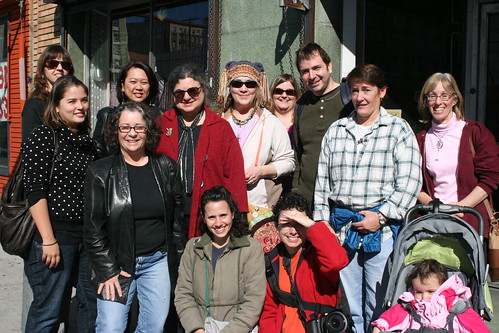
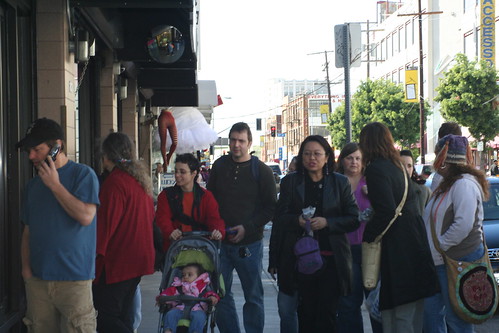
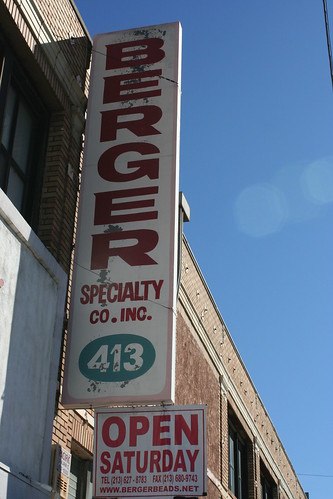
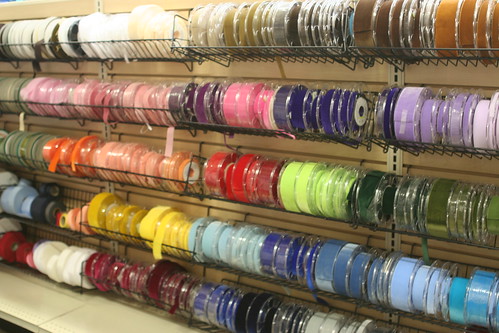
So 12 Ladies from Ventura, LA, Santa Monica and more, met up on a Saturday morning to scour the fashion district for fabric, trims, beads and more. Five of us also hit up the jewelry district for tools, beads and findings. It was great to put faces to all the beautiful work we see on Etsy. The group had photographers, doll-makers, jewelry designers, bag-makers, seamstresses, knitters, and more. So Sandy of sandysimone.etsy.com took on the role of leader and she really needed a flag to keep all of us women together. Some of the places we visited were Michael Levine's for fabric, Berger's Beads, Bella Findings, A to Z Tools, Sadco. I know I am forgetting places and after a few stores we branched off in groups to find what everyone came downtown in search of. Diedre of Blackbird72.etsy.com and her husband pointed some of us in the direction of the flower district where we sat down and had some lunch. The group that made it downtown for our first meetup was Erin of knittergirl, Kim of visionsquest, Sandy of sandysimone, Jennifer of porterness, Elena of elenamary, Joanne of crazyartdolls, Christie of precioustwinkle, Valorie of arttoweardiva, Annie of anniekdesigns, Diedre of blackbird72, Nina of prettycheapjewelry, and myself Amanda of amandaklockrowjewels. If I missed anyone or spelled any names wrong please let me know. I am the worst with names. I stole the photos from Sandy and Nina, thanks for taking them.
Artists Books Made Here Show!!

CCCOE member Elena Mary Siff and many other talented Central California book artists are having Artists Books Made Here at the Elverhoj Museum in Solvang, California. The reception is February 8th from 5-7 pm. The exhibit runs from February 2- April 6 so if you are in the area it is definitely worth checking it out. Judging by Elena's beautiful work you won't be disappointed.

Monday, January 28, 2008

ETSY IN THE NEWS!!

Thanks to Tami Cate for bringing this to our attention!
January 30, 2008 10:04 AM PST

Crafty commerce site Etsy gets $27 million in funding

One of New York's most talked about tech start-ups these days is undoubtedly Etsy, the Brooklyn-based online marketplace for buying and selling handmade goods. And it's continuing to generate headlines: co-founder Robert Kalin announced in a blog post Wednesday that the company has picked up an impressive $27 million in Series D financing.

The venture funding comes from existing investors Union Square Ventures and Hubert Burda Media, as well as Accel Partners' Jim Breyer, who will take on a seat on Etsy's board of directors.

Etsy is "almost break-even" when it comes to profits, Kalin admitted in his blog post, but it does have 650,000 registered users, 120,000 of whom are classified as "sellers." The company employs about 50 people, and last year opened the Etsy Labs community space in a converted industrial space in Brooklyn.

With the new financing, the company hopes to achieve a laundry list of goals: expand beyond the U.S. dollar and the English language, improve its search and checkout technology, ensure that it can pay its employees fairly, keep its servers running, and have a "cushion" to ensure stability through current economic woes.

It's as much a social mission as an economic one, Kalin wrote. "Throughout the myriad challenges since we launched the Web site, we have worked day and night to see things through. We're in this for the long haul," he said. "We believe that the world cannot keep consuming the way it does now, and that buying handmade is part of the solution.

Monday, January 14, 2008

How To Become A Pro in the Chat Room ...

The Newbie's Guide To Etsy Chat (used by permission of Duet.etsy) So you've heard about the chat rooms at etsy, but you're afraid of making a fool of yourself? Say no more, Duet is here to save you. I've put together a chat-cheat-sheet, one that will have you chatting like an old pro in no time. First, where do you find the chats? Go to the Etsy Forums and look at the top right of the page. You'll see a link for chat, and the three main chat rooms. See picture below. Click on "chat rooms." (You can also click red, green, or blue, to be taken directly to that chat room.) After a brief loading period, in which you are being connected to the chat server, you'll see a Lobby Page. This Lobby Page shows you all of the chat rooms currently open, and the miniature avatars of the chatters within. From here, you can join one of the rooms already open, or you can create your own chat room. User made chat rooms can have passwords, or they can be open to all--its your choice. A box is provided below the room list to input a name for your chat room. (People often hold Street Team Meetings, Etsy Guild Meetings, or hash out the details of a transaction in passworded rooms.) There are 3 main chat rooms--Red, Blue, and Green. The colors have no significance, they are simply names. See picture below. By clicking on a certain room's Join button (far right side) you will be brought to the chat room of your choice (assuming it isn't full already,) after another quick loading page. For the purpose of ease, I'll break down what you'll see into 3 main areas: Left Side, Right Side, and Bottom. Please reference picture below. Left Side On the left, you'll see the various conversations people are having. Line by line, these sentences scroll up and disappear. You can not scroll them back down, so once it goes off the top of the page, its gone for good. Each one begins with the name of the person who typed it, so you can know who are you talking to. When you type and click send, your message will also appear here. Right Side On the right side, you may see large thumbnail pictures of etsy items start to appear. These are items from etsy sellers, either in the room or not, that someone wanted to share with the rest of the room. See something awesome while browsing etsy? Share it here. Want to show off your latest listing? Share it here. Majority of the time, this function is used by someone browsing the shop of another chatter, and who wants to share something they found. A small version of the poster's avatar is attached to the item's picture. You can click on that tiny avatar to go to their shop, or you can click on the item itself. Clicking on the item will expand it to give you the option of seeing the full listing, in another window (click More to do this.) Wait long enough, and someone will put one of your items here--its polite to say thank you when this occurs. So, how do you do this? Its as easy as can be. Find a nifty item in someone's shop. Copy the item's url and paste the link into the Listing I.D. box located at the bottom left side of your screen. Click Add and it will pop up above that box. Voila! You've shared that item with the entire room. **It is considered impolite to spam the room with nothing but your own items, over and over. Doing this will create a negative response from the rest of the chatters, someone may politely ask you to join the conversation instead of spamming the room, or you will simply be ignored.** The Bottom At the bottom of the screen, you can see the avatars of every person in the chat room. In the picture above, you can see an expanded section next to my name, Duet. This happens when you hover your mouse over an avatar. Three options appear when you do this: shop, profile, /msg. Click shop to visit that person's shop, click profile to see their profile, and click /msg to send them a private message in chat. "/msg Duet" appears in the chat box when someone clicks on mine, and they can then type whatever private message they want to, to me. This is also where you can set the color of your name in the chat. Click on any color in the row of colors to choose from, below the text box. Alternately, you can set your color manually by choosing a hexadecimal color. To do that, type /color (color code here.) I set mine manually, by typing "/color cc0033. You can find hexadecimal codes here: http://www.december.com/html/spec/color.html If that's too much hassle, just click a color from the color bar. Scroll down on your screen to see a helpful list of commands provided for you. This is your "in-chat" cheat sheet. Other Nifty Chat Features There are some really fun things you can do in chat. You can spin your avatar, make it bounce up and down, set yourself to "away" for a few moments, perform an action (the text you see in blue,) throw different shapes across the screen, get rid of item pictures on the left side, and grab someone's attention easily. Here's a list: Performing an action: type /me (what you want to do here) Example: typing" /me shows the room her new item" will produce this: Duet shows the room her new item Spin: type /spin (Your avatar will spin on it's own whenever you are typing) Bounce: type /lol Away: type brb OR /brb OR /away (this will fade your avatar, letting others know you have stepped away from chat briefly) To set the title of the room (seen at the top of the page,) type /title and whatever you want it to be. To remove a picture on the left from YOUR sight, simply click and drag it off screen--use a little throwing motion and it flies off the screen! To grab someone's attention, type out their full name. If they have sound on, they will hear a "Bonk!" sound, alerting them to the chat screen. You can also type the first few letters of the name, press the Right arrow key on your keyboard, and it will fill in the rest for you. Tokens are fun. See below the chat box, where there's a tiny little number and a shape of some sort next to it? The number tells you how many tokens you have available, and will go up to 20. The longer you are in chat, the more tokens you have, and they replenish after using them. Tokens are used by clicking on the screen where you see all of the conversations. Often one person doing this will set off another, and another and another, until the whole screen has falling cookies or glowing orbs floating across it. You can change which token is selected for the room by typing /shape (name of token you want here) like so: /shape cookies. Click on the screen, and cookies will fall. List of tokens: cookie, star, orb, coffee, notes, cross, haim. Yes, Haim:) And there you have it! The Newbie's Guide to Etsy Chat. All kinds of things are discussed in chat, from how to make crafts to potty training to forum discussions to recipes to banner making to, to, to..... It can be calm, quiet chat, or it can be rowdy, adult chat--it all depends on who has stopped by to have some fun. It takes time to become comfortable with chat, as it often moves quickly and seems like everyone knows everyone else already. Just jump in with a hello, add your two cents to the topic at hand... a quiet chatter isn't a chatter at all:) It won't be too long before you can consider yourself a "regular.