The California Crafters Club of Etsy (CCCOE) is a group of independent artists, crafters, & artisans from California who sell their wares on Etsy.com.
Showing posts with label social networking. Show all posts

Friday, November 25, 2016

Instagram Scavenger Hunt

Remember scavenger hunts? Someone gives you a list of odd items, and you go out and find them. The first person (or team) to return with the most items the quickest wins the game.

But now we have Instagram, so there's no reason to bring the items back to anywhere...


Wanna play?

Below is the list of things to photograph and post to Instagram. Use #CCCOEhunt so I can tally points and #CCCOEchallenge to be a part of the November (and into December) social media games (and the challenges that I've been posting since August).

Each item is worth 5 points. The first person to photograph and post the item gets 10 points.

You may combine as many items from the list into one picture as you wish, but you'll only get one first credit per shot. Make sure to indicate which item(s) on the list your picture is of. I may or may not recognize it, especially if you go very arty. (But please, do go arty. That's half the fun.)

The list:
  1. An item for your shop "in progress" 
  2. Your work space
  3. A new listing
  4. An order in the process of being packed up for shipping
  5. A shot from a craft show/marketplace (doesn't have to be your items)
  6. One of your items on/with a person
  7. A repost from another CCCOE shop
  8. Using the black & white filter
  9. The moon
  10. Water
  11. A rainbow
  12. A holiday display
  13. A yellow traffic light
  14. A tree
  15. A wild bird
  16. Your/your friend's pet
  17. A parking lot
  18. Something red
  19. A post-it note
  20. A hand
Good luck!

Wednesday, November 16, 2016

Facebook Tag

The purpose of social media is interaction. It's a conversation held in public. But, those of us who attempt to use social media to get attention to our shops find that our efforts bring us no benefits. Why is that? Could it be that we're not really interacting?

So, let's interact. What better way to interact than to play a game?


You've been tagged.

Did you follow a link to this post via someone writing on your timeline? Then you've been tagged. Welcome to the game. 

Step 1: On the timeline of the person that tagged you, you can post anything you wish. (Just remember to keep it professional!) Is there an item you wish to highlight? Or perhaps just a link to your shop. Post a photo, tell a joke, or just thank the tagger for including you. (A like for their page might be nice as well.)

Step 2: Tag someone else.
Choose any team member. Like their Facebook page. Then, on their timeline, tag them. (Include a link to this post so they have access to the rules.)

And that's it. If you wish, you can tag more than one shop. Have fun with this. Happy tagging.

Friday, November 4, 2016

Twitter Attack

One way to promote your business is to engage on social media. And instead of costing you advertising dollars, it'll just cost you time. There are all sorts of venues to explore. I've mentioned several of them on this blog in the hopes that you would find one (or more) that you like and engage.

Going on social media and posting "look at my stuff" all the time is the quickest way to get ignored. So, instead of those stogy posts, let's play a game.

I call it Twitter Attack. Anyone can play. All you need is a Twitter account. You can even sign up just to join in.


Step 1: As this is a team event, you'll need to follow the team. I've compiled a list of CCCOE members here. (And you might want to follow me, too.)

I tried to follow the whole team and add them to the list, so if I missed your Twitter account, let me know and I'll include you.

Step 2: Create a Shameless Blatant Promotion tweet. Make sure to use a picture. Include a link. And use #CCCOEchallenge so we can find you.

Step 3: Promote a fellow CCCOEers shop and/or item. For bonus points, talk to them directly--ask a question, pay a compliment, etc. And make sure to use #CCCOEchallenge.

Step 4: Retweet any #CCCOEchallenge tweet.

Step 5: The Attack. To another CCCOEer, "prank call" them. If you're old enough to remember prank calls, you remember the silly jokes. Put it in tweet form and attach their twitter handle. (Feel free to hit me up: @ZiziRho, or the team: @CCCOE.)

If you don't remember prank calls, feel free to just tell a joke. Or make some random comment or observation--the more random, the better. (But keep it nice. This is a promotional event after all.) Use #CCCOEattack so we can all enjoy the fun.

Some Twitter tips:

  • There are several 3rd party apps to help you manage your tweets and lists. Buffer is a way to schedule tweets to post all day without you having to be on Twitter all day.
  • Add pictures to your tweets. A great image is more likely to entice someone to click on a link.
  • Be yourself. People prefer to read tweets of real things written by real people. 
  • Talk to others. If someone asks a question, answer. If someone tweets something that you have a response to, do.
  • Join Twitter chats. Check out trending topics. Almost daily, someone is doing some pun or other. Feel free to join in.

Tuesday, November 1, 2016

Would You Like to Play a Game?

Welcome to November. Here's where the things start to ramp up for the holiday season.

Last month's Promote-a-thon was a dud. I blame myself. I was down with a cold towards the beginning of the month, and the rest of the month I was playing catch up for all I missed while I was down with the cold.

But it's a brand new month with new possibilities. And I thought we'd do something fun.

Would you like to play a game? Or rather, multiple games? Social media games?

To begin, make sure you're connected:

The first game is starting soon.

Friday, May 13, 2016

What Networks Do You Belong To?


Just a quick question for the team this week. I've spent a bit of time talking about social media with regards to our shops, and I was wondering.

What social media are you involved with? Do you have a Facebook page? Twitter? Instagram? A blog?

And, have you embraced some of the other options? YouTube? Snapchat? Vine? Anything that we might not have heard of?

Please, share. Add your links to the comments. I'd love to hear from you.

Wednesday, April 13, 2016

An Ideal Customer

Who is your ideal customer?


The ideal customer is an avatar you create to help you target your social media efforts. Who, exactly, are your products made for?

First, sit down and create an ideal customer profile. It's okay if you have more than one. Get specific. If you make jewelry, your ideal customer is likely female. But, how old? Is she married? Does she have kids? What does she like to do on a Friday night? (These profiles should get detailed. You can create your own questionnaire, but there are others you can find online to start with.)

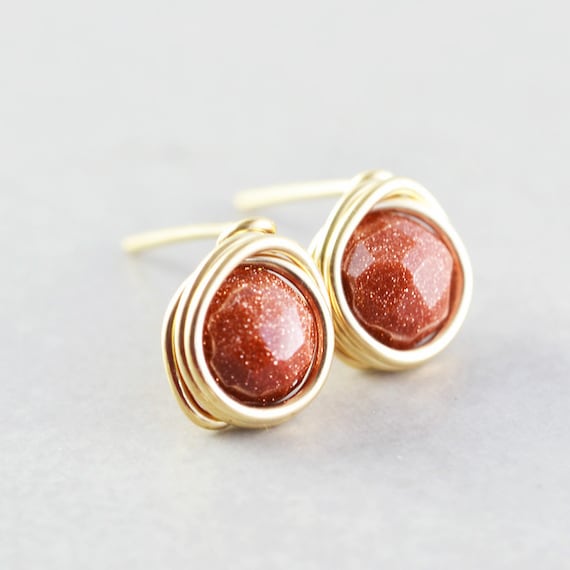
Goldstone Post Earrings, Warm Brown Studs, Chestnut Brown Posts
Goldstone Post Earrings by NansGlam

This is your starting point. Instead of constantly tweeting "buy my stuff", you can tweet things that'll be of interest to your ideal audience. Spur engagement. Create fans.

When you know who your ideal customer is, you'll know where to target your efforts. If your ideal customer is a teen you'll want to minimize your Facebook time (most teens consider Facebook to be for "old" people) and spend your time on Instagram or Snapchat. If your ideal customer is a mother in her 30s, you'll want to maximize your Facebook and Pinterest time.

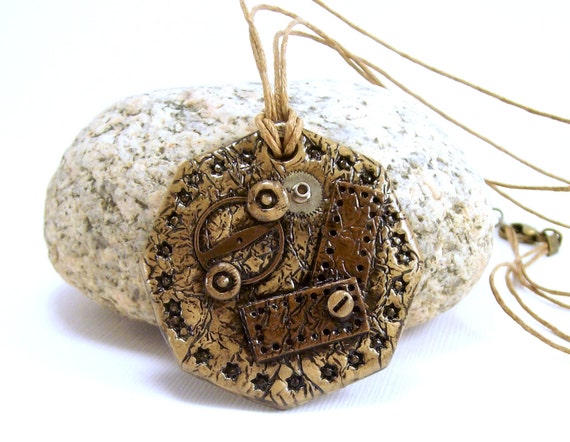
Polymer Clay Jewelry Pendant Necklace - Steampunk Pendant - Boho Necklace - Rustic Necklace - Artisan Handmade - Geometric Jewelry -
Steampunk Pendant by Bobbles By Carol

And now you'll also know what sorts of things to post. Is your ideal customer a reality TV fan? Perhaps you can post a reaction to the latest episode. If your ideal customer likes to know how things are made, you could create a YouTube video showing your process. When you run across articles of pictures that you know your ideal customer would like, add them to your various feeds.

It may seem like a lot of effort, but targeting who you're spending your time trying to reach will save you time in the end. It'll give your social media presence a purpose. No more scattershot posts.

Who is your ideal customer?

Wednesday, March 9, 2016

Connecting Via Blogging

Do you have a blog?

©Ivan Walsh


While blogging can be a great marketing resource, many craft businesses don't maintain a blog. It can be rather labor intensive. But it's a great way to connect with your target customers and engage with them on a regular basis.

It's also an excellent way to boost your SEO. We spend a lot of time focusing on creating keywords that'll get us found in Etsy search. But one of the big factors in the Google algorithm is "expertise", or "how many links back to your webpage do you have?". The more links, the higher you place in the search listings.

A great way to create links is to have them in a blog post. These do need to be fairly organic--they need to read like a human wrote them. (There's a reason why the "from the team" posts here are structured as they are.) They're better if they come from a variety of sources. But the occasional link to your product with a description surrounding it will help boost it in various searches.

The reason I bring up blogging now is to alert those of you who do have blogs to a great opportunity to find new blogging buddies. (The best way to keep readers coming to your blog is to read other bloggers' blogs and interact with them.) And if you're thinking about starting a blog, this is a great place to find like bloggers and see how they do it. (You're not stealing. You're getting ideas.)

It's called the A to Z Challenge. It goes throughout the month of April. Check out the link for more information. It's a huge event in the blogging world, and all sorts of bloggers get involved. I highly recommend checking it out and participating if it's something you can manage. If not, it's still a great way to find crafty bloggers that you may not have been familiar with.

The A to Z Challenge Badge

Do you have a blog? Leave the link in the comments so we can stop by and visit you.

Friday, February 12, 2016

Taming the Twitter Beast

A couple days ago, I finally got around to trying to tame my Twitter feed.

©Jean-Bastien Prévots

It had gotten so unruly that I barely even looked at it anymore. It's hard to keep track of people. So, how did I tame the beast? Lists. 

Click on your name: 


It's right there on the end. If not, you'll have to go into your profile to find it.

Lists are a great way to keep like feeds together, for ease in finding. You can also subscribe to others' Lists, like the CCCOE Team's List. So you can keep up to date on what's happening with various team members.

So, now the plan is to utilize Twitter a bit better. Because it's a great way to get word of your shop out to potential customers. (Especially since Etsy's search might be burying you from time to time. Thanks to annie k designs for finding the link.)

Yes, you want to find your customers. Who buys your items? You want to engage with the types of people who you're products will interest. But you don't want to hard sell. You want to talk to them, answer their questions, and become a Twitter buddy. Then, when they're in the market for something for themselves or a gift, your shop will be at the front of their minds.

But more than customers, you want to find the influencers in your area. These are the people who have loyal followings. If they like you, they might retweet you, and your reach will grow.

Then, you can also utilize Twitter to find content to feed your networks. You can only tweet a picture of your beautiful merchandise so many times before people start to tune you out. You'll need other things to tweet, and retweeting things that your customers might find of interest is one way to remain in the forefront of their memories.

You also have other social networks. An interesting link to an article you find on Twitter might be just what your Facebook followers would enjoy. Perhaps an interesting picture should make it to your Pinterest. This freshens up more than just one network. It keeps you relevant on many.

How do you use Twitter?

Friday, May 15, 2015

If This...

Keeping all your social media channels up to date can be a challenge. Turns out there is a tool to make things easier. There is a way to sync all your social media platforms...

IFTTT-logo


It's called ifttt and that stands for "if this, then that". From this formula you can create "recipes". It's useful for things like "if I change my profile picture on Facebook, then my profile picture on Twitter also changes". 

For a while now, I've wanted to send a link for these posts to my Facebook page. (I write the posts in advance and schedule them to go live at a later date.) Sure, I can wait until I get online (hours later) to do it, but what's the fun in that? I looked and looked for a way to do it, but to no avail. 

Once I had an ifttt account, it took me two minutes to set it up. And I'm probably overestimating how long it took. 

At the moment, this is the coolest thing ever. 

And they have Etsy recipes:

Don't see what you need? You can create your own recipe.

Do you use ifttt? Any good tips for us? Ever heard of it before?

Friday, March 13, 2015

All About Pinterest

An informal poll of the team revealed that the social media site they're most curious about is Pinterest. Which makes sense as Pinterest is where DIYers spend most of their time, whether their interests are crafty, decor, cooking, or anything else where images are shared.

pinterest-logo


What is Pinterest


Pinterest is a virtual corkboard which can be shared with anyone world wide. It's also a handy bookmarking site, where you can easily store links to various websites and retrieve them via the images associated with them. And because of the sharing aspect, you can easily find other like images through various searches.

How does this thing work?


On one of my journeys through the Internet, I stumble on an image--a funny meme, an awesome knitting pattern, a scrumptious dessert, or an informative infographic. I want to save it so that I can access it later, so I "pin it". 

Pins can be saved to "boards" which can be organized however you wish. You can title them, describe them, and allow others to pin to your board as well. Any and/or all of your boards can be "followed" by any other Pinterest user unless you make the board private. 

You can originate pins from anywhere on the Internet, but you can also "repin" images from other pinners. This is the social aspect of the site. You can browse various categories or you can find pinners whose taste you admire. 

Following is how you keep up-to-date with a pinner. You find someone who pins the best chocolate desserts. After perusing the board, you want to know when new desserts are added. So, you follow the board. 

Anyone you follow will pop up in your feed. You'll see their latest pins. And anyone who follows you will see your pins in their feed.

But beware. This may seem harmless. Once you start looking, you'll find hours of your life disappear and you'll wonder where they went.

Some Tips:


  • Make sure to pin from the original website when possible. (This gives the image owner the traffic and is just good manners.)
  • From blogs, use the URL for the individual post, not the blog as a whole. (Three months later when you want to locate the actual image or something that corresponds to that image, the individual post will be lost to you, and you may never find it again.)
  • When repinning, check what website the pin links to. Some pinners have found ways to link images to things not associated with those images...
  • You can type in a description on any of your pins. Do it to help you remember something about why you saved it.
  • You can also "like" pins from other pinners and comment on those pins. This is another way to engage with other pinners.
  • You can hide any board you wish, but all are public unless you specifically hide them.

There is so much to Pinterest. The best way to to learn is to check it out. And while you're at it, make sure to check out (and follow!) our team members: 

Are you on Pinterest? Go ahead, add your link in the comments. Do you have any good tips for us?

Wednesday, January 14, 2015

Vine

All the kids are talking about it. But does that mean we should be paying attention?

Vine logo -

Vine is kind of like Instagram, but for videos. It's an app that you get for your phone, and then you make 6 second videos. (There's a great article all about how it works here.)  

It could be a useful way to connect with buyers. Imagine showing off your wares in a funny video clip. It might even reach some potential buyers who don't even know they must have what you make. Or, you might find some funny videos to entertain yourself.

Anybody on Vine? Do you like it? Tell us.

Previous posts on social media:

Wednesday, December 10, 2014

Pinterest for Business

Remember Pinterest?


I've mentioned this before. A couple times. 

The only reason I'm bringing them up again (besides not having found something new to highlight this month), is because I only recently learned that you can now make a Pinterest page for your shop. Just go here, and your shop can have its very own Pinterest presence. 

Not sure how to get started? They also have a board called "Getting Started on Pinterest". 

Do you have a business Pinterest account? (Am I the last one to find out about this?) Let me know in the comments. I'm going to want to follow you. 

(My boards are here. But be warned, I'm just getting started.)

Previous posts on social media:

Wednesday, November 12, 2014

Google +

In my ongoing attempt to talk about the various forms of social media that we as Etsy sellers can utilize for our shops (or people can utilize to find all the wonderful independent artisans out there), I've run into a bit of a stumbling block. I've hit all the biggies. Or have I?

I've missed one that should be big, but for some reason it doesn't seem to have the cachet of Facebook, Instagram, or Twitter.


If you have a Google account (and really, who doesn't?) you probably already have a Google + page. If you're anything like me, you don't check in with it very often (turns out my cover image was from Halloween...of 2013). But perhaps we should.

I stumbled across an article that talks about how those +1s can be very useful for things like Google search. I won't rehash the article, so make sure to click on the link.

I should go now and update my Google + page...

How about you? Are you on Google +? When was the last time you checked it out?

Previous posts on social media:

Wednesday, October 8, 2014

Flickr

I don't know if this is technically social media, but today I'm talking about Flickr...


Basically, it's a place where you can upload all your pictures and share them with all your online friends. Sure, Facebook and Pinterest do that to a certain extent, but this is just for the pictures you take. Flickr says that its two main goals are:
1. We want to help people make their photos available to the people who matter to them.
2. We want to enable new ways of organizing photos and video.
I have to admit that I got a Flickr account years ago and have not touched it in a while. It's probably time to go and dust it off and see what it can do. Who it can connect me to. Because isn't that the point of social media?

The team has a Flickr group here. (A widget with link is also in the sidebar. Just scroll down for a bit.)

Are you on Flickr?

Previous posts on social media:

Wednesday, August 13, 2014

PinEtsy

I'm still on a quest to find new social media outlets. Luckily, one of the team found


and posted it on the team site. Upon further inspection, it looks like a Pinterest but just for Etsy people. Just what we all need, another version of Pinterest. (So much to look at, so little time!)

PinEtsy lets you browse, pin, save, sort and manage Etsy's™ best handmade items through a collection of treasury pin boards. Find, connect, and share all things Etsy™ from the top shop owners from around the globe. Through an endless scroll of handmade inspiration, shoppers can discover an exciting world of creativity offered by a community of talented Artisans. 
PinEtsy is a handmade social platform for both shop owners and buyers to connect. Shop owners can easily promote products being offered on Etsy™ linking directly to their listings. Shoppers, Collectors, and Buyers can easily follow Etsy™ sellers by browsing and creating boards of their favorite items conveniently linking to seller shop listings.

Discover all things handmade! It's fun, Its easy...It's PinEtsy!
What do you think? Have you tried them? Let us know.

Previous posts on social media:

Wednesday, July 16, 2014

Handmade Hour

I stumbled across it one afternoon on Twitter. (I follow a few crafty folks.) There was someone retweeting various handmade goods on Twitter. I had to find out more about it.

Handmade Nation


I did a little digging and found a website under construction. It appears to be a British site, but it looks like one can still get in on the ground floor if one is so inclined. 

If you are on Twitter from 4 to 5 PM (that's Pacific Daylight Time) on Wednesdays, check out #HandmadeHourUSA (or just #HandmadeHour) to see all the lovely things that pop up. Or tag your own tweet and it might just be retweeted for all of their followers.

If you are on Twitter, it's a good idea to check them out...

They are also on Facebook:

Anyone know anything more about them? What can you tell us? Let us know in the comments.

Previous posts on social media:

Wednesday, June 11, 2014

The Facebook

When one talks about social media, one must reference Facebook.

Facebook logo

Facebook has been around for 10 years now, and it is one of the most popular sites in the world. 67% of Internet users from the US are on Facebook. (In the UK, it's 82%.) It is also the most popular app on smartphones. (Source)

While teens ages 12-17 still are on Facebook, adults are more active on the site. (The teens are more into the next big thing.) And adult use is intensifying. (Source)

What is there to say about Facebook that we don't already know? It's the one social networking site that is kind of ubiquitous. We can't escape it. And what shop would be complete without a Facebook page?

Here are some of our Facebook pages. Please, make sure to like them (we appreciate your support!):

Previous posts on social media:

Wednesday, May 14, 2014

Coming Soon

I'm preparing a post on Facebook. I have been for a while. But it's hard. Everybody is on Facebook, right? So what more is there to say?

(That, and I'm going to include a list of Facebook pages, but it takes time to get those compiled. Keep an eye out in the team threads, as I will be putting out a call for those soon.)

So, this month for social media talk, I'm posing a question. What social media do you use? Which sites have helped your business? Which sites were more trouble than they're worth?

Previous posts on social media:
Pinterest
Blogging
Twitter
Wanelo
Tumblr
Instagram

Wednesday, April 9, 2014

Share the Pretty Pictures

It's the of-the-moment social networking site for all the kids. Or, at least it was 5 minutes ago. Hard to keep up with the kids.

Instagram Logo

Instagram is a photo-sharing phone app. It's kind of like Twitter, but for pictures. You snap a shot from your phone, add on a filter, and put it out there for your followers. You can tag, hashtag, comment on, and like photos. Your followers can do the same with the photos you've shared.

It seems like at the beginning I heard people shared pictures of their food. Now, you can find people sharing all sorts of lovely pictures. 

For Etsy shops, it's a great way to show off our wares as well as our process. Etsy just did a blog post on this very topic...

Are you on Instagram? (Let us know so we can follow you.) Do you have any tips to share?

Previous posts on social media:
Pinterest
Blogging
Twitter
Wanelo
Tumblr
Wednesday, March 12, 2014

Pinterest for Beginners

A while back I posted an infographic about how Pinterest is the one social network site that has the longest longevity. That is, something posted there might generate interest six months to a year later, whereas Twitter's influence lasts about 18 minutes. (Apparently the infographic has disappeared, but that site has more posts about Pinterest that may be of interest.)

This was the first post of my social networking series.

So, just this weekend a discussion about Pinterest began on the team's discussion boards, and I thought now might be a good time to revisit the topic.

Pinterest explains itself thusly:
Pinterest is a tool for collecting and organizing things you love.
I like to think of it like an online visual bookmarking tool. When I find images that I like, Pinterest is the place where I can store them so I can find them again.

As a social media site, Pinterest lets you share what you pin. Sure, you can make some of your boards private, but that negates the social part of the platform. The whole idea is to share what you find with others.

To find pins from others, you can follow them or some of their specific boards. They can also follow you. You want to follow people who have similar taste to yours, that way you can find images you might not otherwise find. Likewise, you want people to follow you...hopefully back to your shop.

A word of caution: make sure when you pin things to pin from where the image originated. It's a copyright thing. Also, that way you can find where the image originated again if you'd like to find the tutorial that goes along with the image or the shop that goes along with the image (or whatever else the image links back to).

(If you're pinning something from a blog, for example, make sure to click on the specific post, not the full blog. If the blog is updated regularly, the image will fall off the front page, and if you go looking for the image months later, you might not be able to locate it again.)

Some people pin images and then link them back to spam sites, so when you repin, be careful. (I tend to "like" images before pinning them to my boards. Only after making sure the image links to a real website do I pin it.)

Of course, the purpose of Pinterest is to have some fun. Finding images. Curating images. Looking at stuff. (Why do we love to look at stuff?)

What's your favorite thing about Pinterest? What have I missed? Oh, and make sure to add your Pinterest link so we can all follow you.

Previous posts on social media:
Blogging
Twitter
Wanelo
Tumblr